
TiviMate Premium: what it unlocks, what it costs, and how to get it
Premium turns the free player into a proper one: multiple playlists, recording, and multi-view. It’s about ten dollars a year and you buy it through a companion app, not inside TiviMate. Here’s the whole thing, minus the guesswork.
What TiviMate Premium actually unlocks
The free version already handles live TV, the EPG guide, and a single playlist. Premium — also called TiviMate Pro — is about removing limits, not installing a different app.
Multiple playlists
Run several IPTV providers side by side instead of being locked to one.
Built-in recording
Record live TV straight from the player — no extra app, no workaround.
Scheduled recordings
Set a match or show to record ahead of time from the program scheduler.
Multi-view
Watch several channels at once — handy on game day.
Custom channel groups
Full control over favourites and how your channels are organised.
Sync across 5 devices
The license follows your Google account through Companion, on up to five devices.
Why people pick TiviMate over every other player
Plenty of IPTV apps exist. TiviMate keeps winning for a handful of concrete reasons.
Best-in-class EPG
The on-screen guide is the cleanest and fastest in any IPTV player.
Rock-solid recording
Record and schedule live TV without bolting on a separate DVR app.
Multiple providers
Combine several playlists into one tidy, unified channel list.
Multi-view
Keep several channels on screen at once — made for game day.
Actively developed
Regular updates and fixes, not abandonware that breaks after an Android update.
Runs on everything
Fire Stick, Android TV, boxes and more — the same player wherever you watch.
Is the upgrade actually worth it?
If you watch one service on one device, free is genuinely fine. The moment you want to record, juggle two providers, or set up a device for the family, Premium earns its keep.
| Feature | Free | Premium |
|---|---|---|
| Live TV + EPG guide | Yes | Yes |
| Number of playlists | 1 | Multiple |
| Built-in recording (PVR) | — | Yes |
| Scheduled recordings | — | Yes |
| Custom channel groups | Limited | Full |
| Multi-view | — | Yes |
| Ads | Some | None |
| Auto Frame Rate (smooth sports & film) | — | Yes |
| Multi-device sync | — | Up to 5 devices |
How much does TiviMate Premium cost?
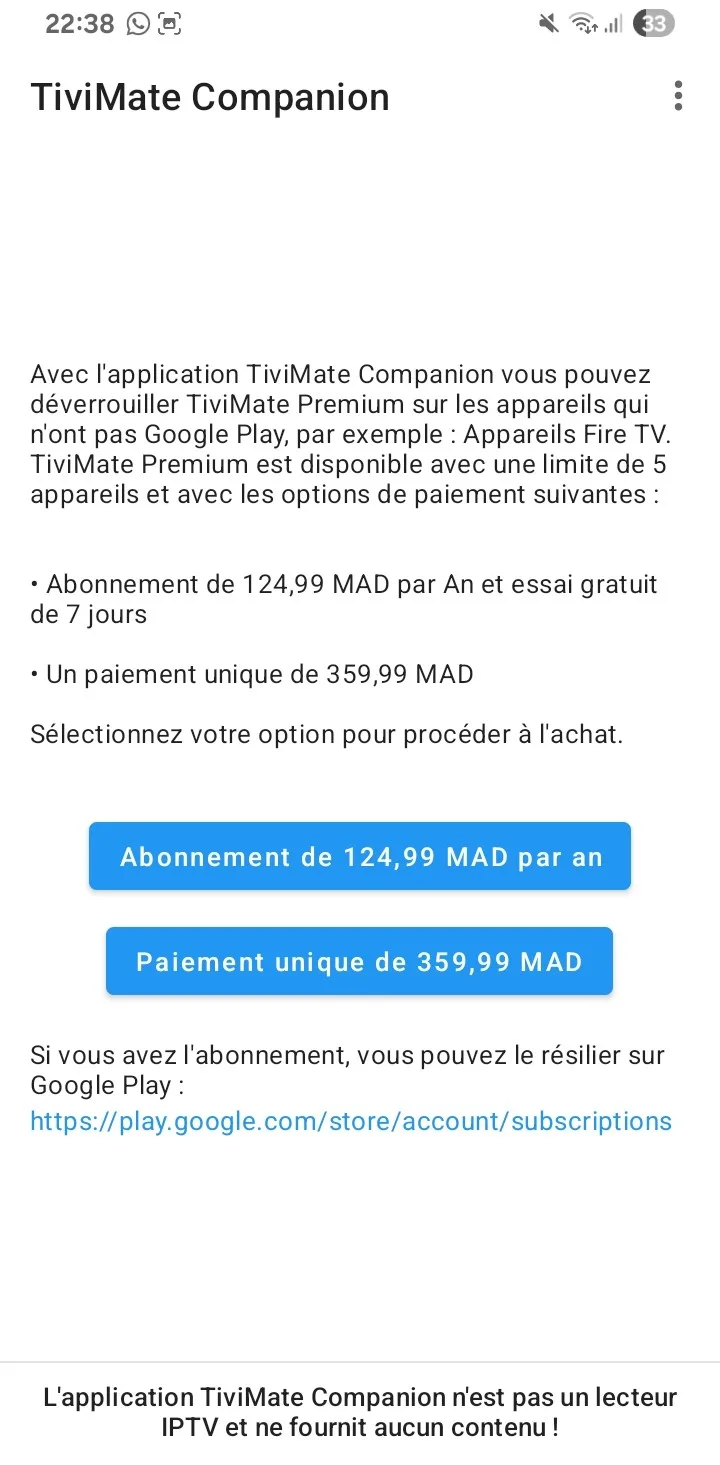
Premium is a paid unlock sold through the TiviMate Companion app, not a monthly bill. Two tiers:
- All Premium features
- Usually a 7-day free trial
- Best for trying it out first
- Pay once, keep forever
- Breaks even in ~year 4
- Best if IPTV is here to stay
A mid-2026 bump pushed yearly toward $11.99 in some regions, and lifetime as high as $37.99. Always confirm the live price inside the Companion app before paying.
How to buy TiviMate Premium
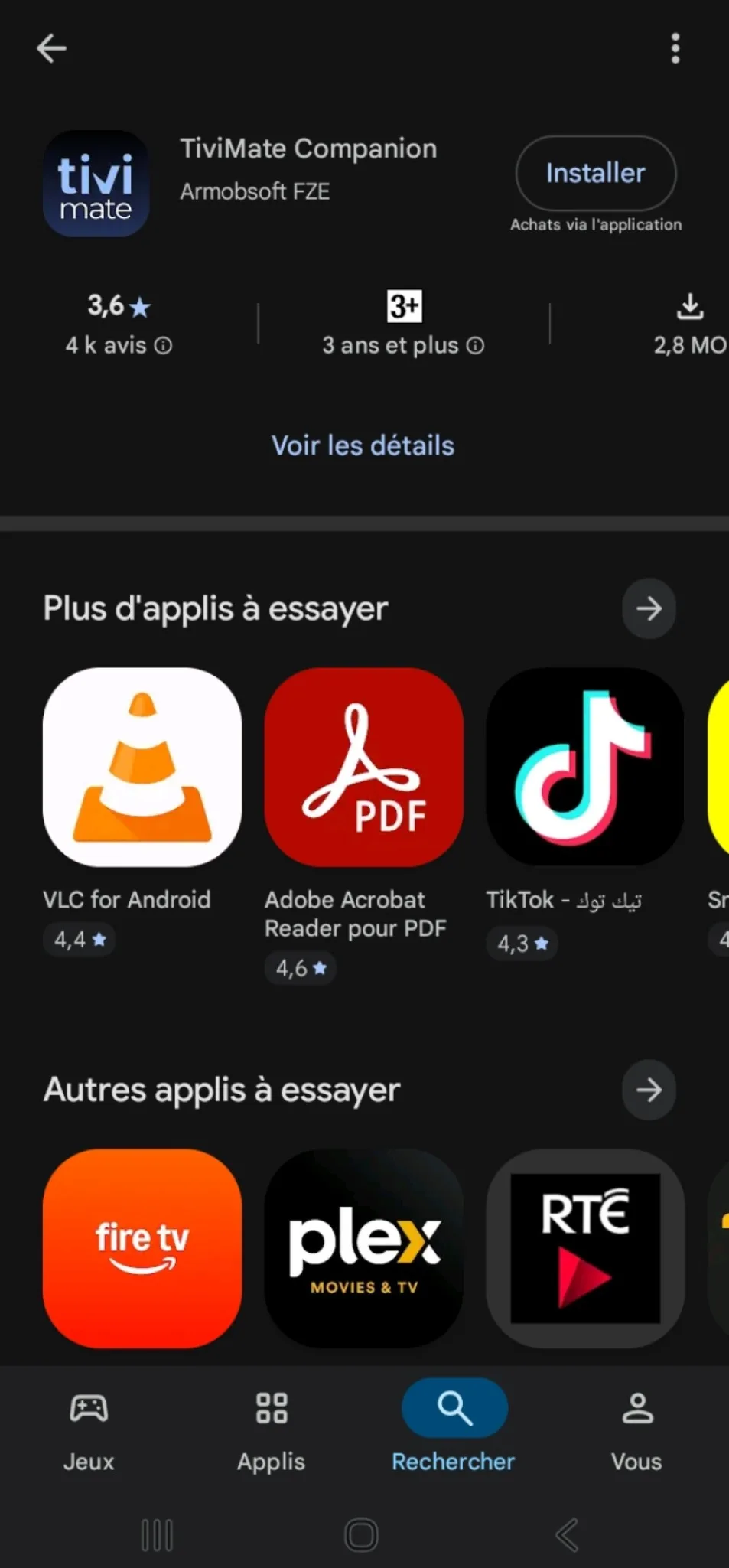
The part that trips people up: you don’t buy Premium inside TiviMate. You buy it in a separate app called TiviMate Companion, and the unlock syncs back to your player.
Install Companion
Get TiviMate Companion from the Google Play Store.
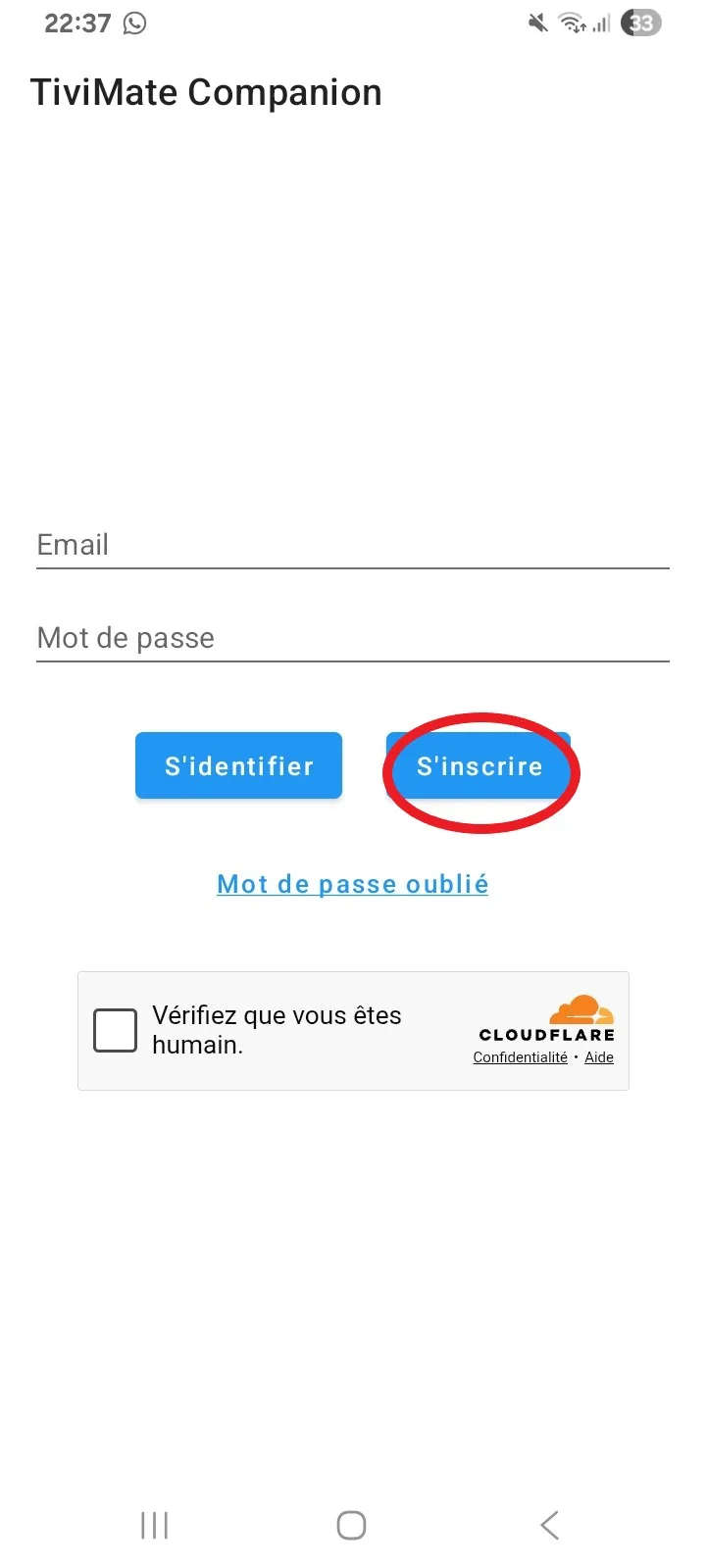
Sign in
Use the Google account you’ll use on your streaming devices.
Pick a plan
Choose yearly or lifetime and pay through Google Play.
Open TiviMate
On the same account — Premium switches on automatically.
No Android phone? (iPhone / Apple TV users)
Buy Premium once on any Android device, an Android TV box, or a Fire Stick, using the Google account you’ll use everywhere. The unlock is tied to that account through Companion, so it travels with you — you only need Android for the few minutes it takes to pay. TiviMate itself is Android-only (no iOS or Apple TV version), so on Apple hardware people usually pair a different player such as GSE Smart IPTV.
“I can’t find where to buy it” — you’re not imagining it
A lot of people hit a wall here, and it isn’t you. The purchase option on TiviMate’s own official site is often hidden or unavailable depending on your country — the payment processor doesn’t cover every region — which is why some users only see it after switching their location with a VPN. The route that works for everyone is the Companion app above: buy there on any Android device and it syncs to your player. And if a recording or catch-up prompt ever shows a “Get Premium” link inside TiviMate, that works too.
Is your internet stream-ready?
Buffering is almost always the connection, not TiviMate. Test your speed and see which quality it comfortably handles.
Runs in your browser. Nothing is stored.
Plays on the device you already own
Step-by-step guides for getting TiviMate running on each platform.
Fire TV Stick
Sideload & add your playlist. Guide →
Android TV
Straight from the Play Store. Guide →
Smart TV
What works, what doesn’t. Guide →
Apple TV
The workaround that works. Guide →
iPhone / iOS
Buying & setup on iOS. Guide →
Windows / Mac
Run it on a computer. Guide →
Android Box
The smoothest option. Guide →
Any device
All setup guides. Browse →
Premium alone still shows nothing
TiviMate is a player — like a DVD player with no disc. It plays channels but doesn’t supply them. To get anything on screen you add a playlist from an IPTV provider (an M3U link or Xtream Codes login). So the real shopping list is two items, not one:
Choosing that service well matters far more than the app itself. A cheap or overloaded provider will buffer no matter how good TiviMate is. See our recommended IPTV service →
Frequently asked questions
Is TiviMate Premium a monthly subscription?
Not really. It’s sold as a yearly unlock ($9.99) or a one-time lifetime purchase ($33.99) through the Companion app, rather than a recurring monthly charge.
Is TiviMate Pro the same as TiviMate Premium?
Yes. There is no separate “TiviMate Pro” — the paid upgrade is officially called Premium, but a lot of people call it “Pro.” Whichever name you search, it is the same $9.99/year or $33.99 lifetime unlock bought through the Companion app.
How much does TiviMate Premium cost in 2026?
Around $9.99 per year or $33.99 for lifetime. Prices are set by the developer and have risen over time, so confirm the current figure in the Companion app before paying.
How many devices does TiviMate Premium work on?
Up to five. Because the license lives on your Google account through Companion, you can sign in on several devices and Premium follows you.
Is there a free trial for TiviMate Premium?
Yes, the yearly plan usually comes with a 7-day free trial through Google Play. Cancel within the window if you don’t want to keep it.
Does TiviMate Premium include channels?
No. Premium only unlocks player features. You still add your own IPTV playlist from a separate service.
Is there a free version of TiviMate Premium?
The free TiviMate app exists and works well for basic use. Any site offering a free “premium account” is best avoided, since those tend to be scams or credential traps.
Is TiviMate Premium safe and legit?
Yes. TiviMate is a legitimate app, and buying Premium through the Companion app on Google Play is safe. The risk lives elsewhere: “modded APK” downloads and sites selling a “free premium account” are the ones to avoid, since that’s where malware and credential theft show up.
Can I get TiviMate Premium free or cracked?
There’s no legitimate free Premium. Cracked APKs and “free premium account” offers tend to carry malware or steal logins, and they break every time the app updates. If you don’t want to pay, the normal free TiviMate app is the safe option — it just keeps the Premium features locked.
Can I get a refund or cancel TiviMate Premium?
It depends where you bought it. Google Play purchases usually have a short refund window (often up to 48 hours), and a yearly plan can be cancelled from your Google Play subscriptions — it stays active until the period ends. A lifetime purchase is a one-time buy, so there’s nothing to cancel. For anything the store can’t handle, contact TiviMate support directly.